The WordPress plugin that puts approved changes on your site.
Practice Radar reads your page titles, descriptions, social previews and image alt text, proposes better ones after each audit, and applies the ones you approve. Nothing changes without your approval, every change is logged, and any of them can be put back with one click. On Webflow or Wix, the same queue connects through the builder's own API, with no plugin to install.
Start your free monthIncluded from Growth. Download the plugin, a 9 KB zip, one file.

What it does
It keeps to the parts of a page that search engines and social networks read first. It never touches body copy, design or plugins.
- Reads every public page, including treatment and team pages built as custom post types, with the title and description each one carries now.
- Applies the title and description you approve through the SEO plugin you already use: Yoast, Rank Math or SEOPress, so the change shows in that plugin too.
- Keeps social previews in step by proposing the Open Graph title and description when a change would leave them stale.
- Fills in missing image alt text, written for the page the image sits on, on the attachment and in the page where the alt was empty.
- Adds one block of structured data to your home page when it has none, so Google can read you as a dental practice.
- Drafts a local page for a search the audit found no page for, created as a draft in WordPress for you to read before it goes live.
- Appends answers and links: the questions rivals answer and you do not, as an FAQ block with its schema, and one sentence linking a page that ranks to a page that should.
- Fixes what the crawl found: a link that goes nowhere pointed at the live page, a redirect for the dead address, a duplicate heading reworded, an oversized image compressed and re-uploaded with its dimensions set.
- Reads the live page back after every change and says whether it landed, then shows the position on the tracked search on the day it went live and the latest reading since.
- Logs what it replaced, and puts any change back with one click from the same screen.
Why a plugin and not a login
We could have asked for a WordPress password. We chose not to, for reasons you can check.
- No password leaves your site. The plugin issues its own token, and that token can only read metadata and write the fields listed above. Delete the plugin and the token dies with it.
- One file you can read. Three hundred and fifty lines of plain PHP, no libraries, no calls home. It is licensed under the GPL, like WordPress itself.
- Nothing automatic. The plugin cannot be asked to change a page until you have approved that exact change in Practice Radar. There is no batch mode and no schedule.
- It works with your cache. After a change it asks LiteSpeed Cache to refresh that page, so the live read-back is of the page a patient sees.
- Every write is reversible. Each change is logged with what it replaced. A page it created goes to the trash, a redirect is removed, an original image goes back on the page, and the log records that too.
Install in three steps
About three minutes, with no developer. You need to be an administrator on the WordPress site, and the site needs Yoast SEO, Rank Math or SEOPress, which is where the plugin writes titles and descriptions.
-
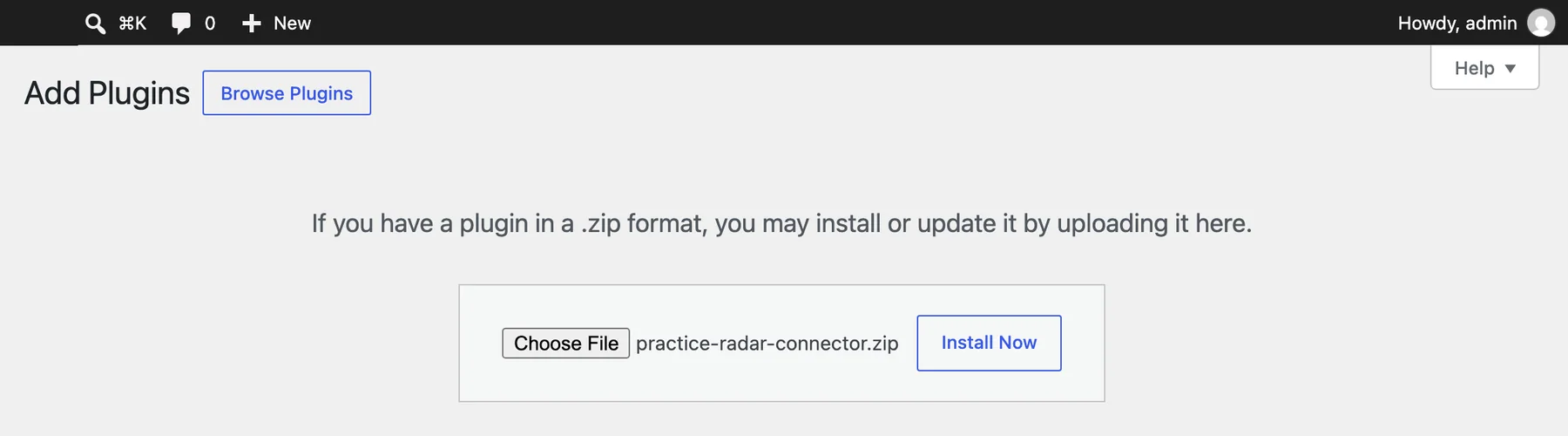
Upload the plugin
In WordPress go to Plugins, then Add Plugin, then Upload Plugin, choose the zip from this page and click Install Now.
-
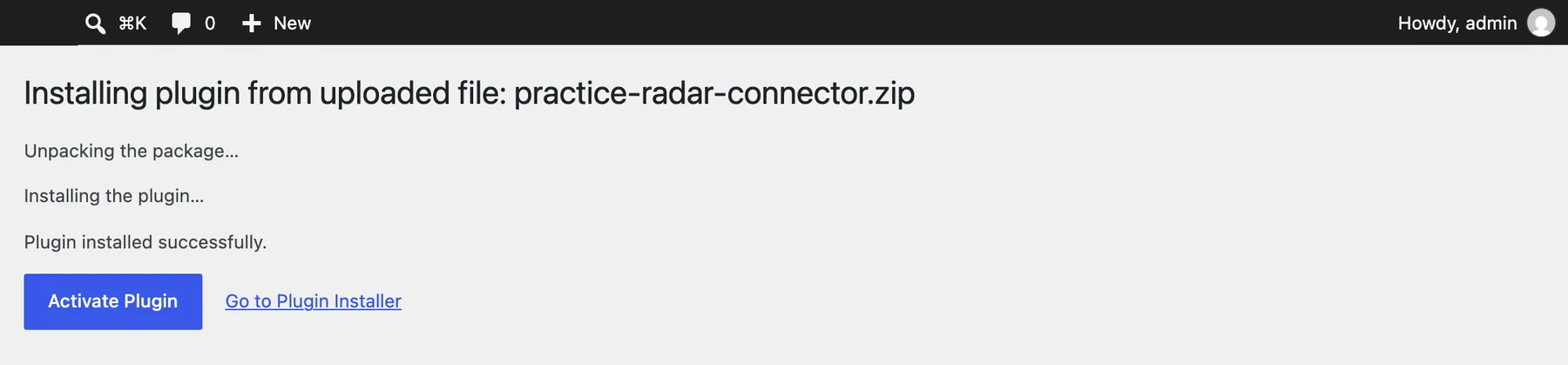
Activate it
Click Activate Plugin on the next screen, and a new page appears under Settings.
-
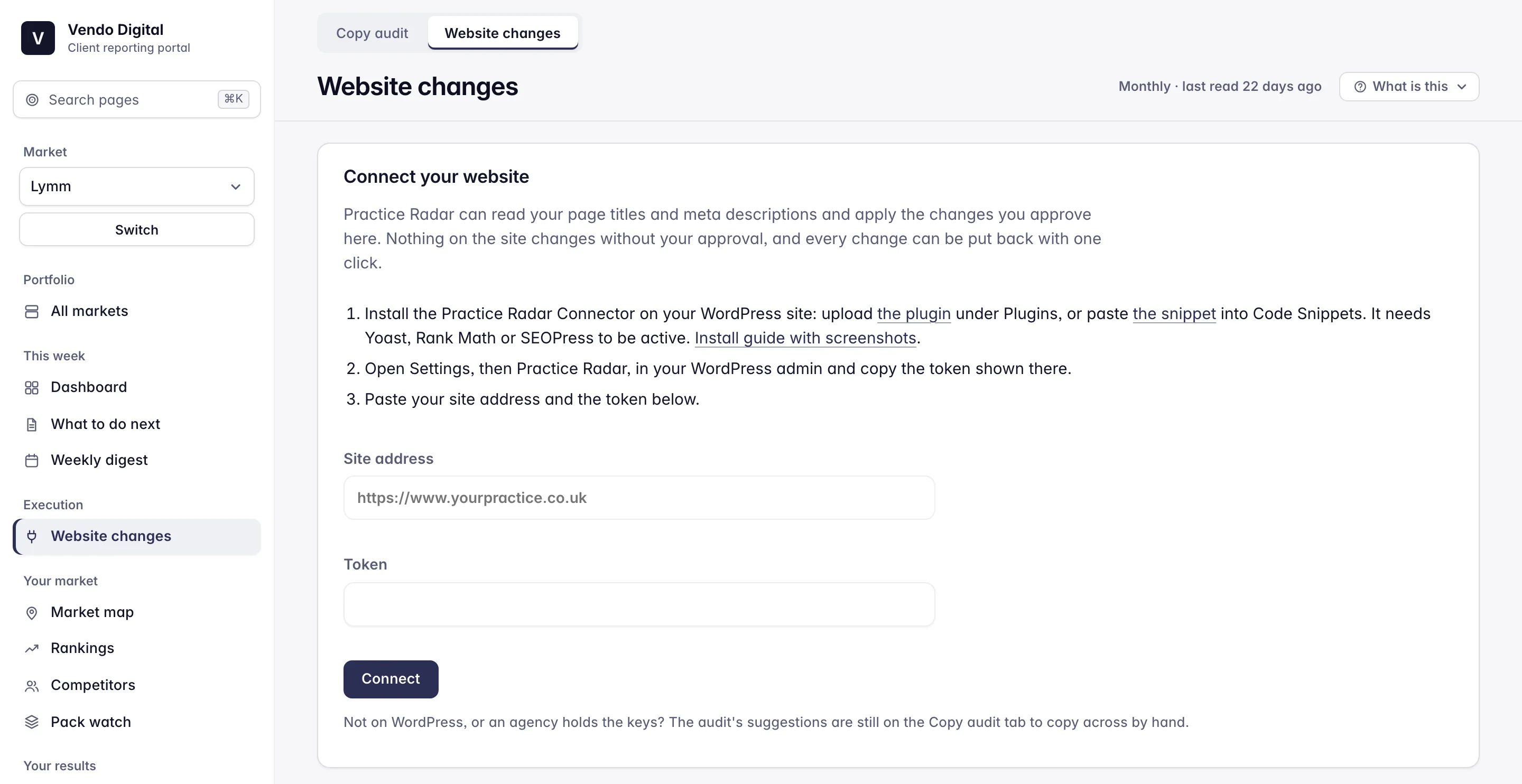
Copy the address and token into Practice Radar
Open Settings, then Practice Radar, copy the site address and token, and paste them into Website changes in Practice Radar, under Execution in the sidebar.


Prefer not to add a plugin? The same file runs as a snippet in the Code Snippets plugin. Paste the PHP file as a new PHP snippet, activate it, and the Settings page appears exactly as above.
Not on WordPress? Webflow and Wix connect below without a plugin. On every other builder the copy audit still tells you what to change, with the wording ready to paste.
Webflow and Wix, through their own APIs
Neither builder runs plugins, and both publish an API that can read and write a page's title, description and social preview. Practice Radar connects to that instead. You create a key in the builder, paste it into Website changes, and the same queue appears: the why, the aim, the wording, the approve button, the one-click put back.
Webflow
In Site settings, under Apps & integrations, generate an API token with Sites and Pages access and paste it in. The queue reads every published page, writes the titles, descriptions and social previews you approve, and publishes the site so the change is live. Webflow allows one publish a minute, so a run of approvals may ask you to wait between them.
Wix
In your Wix account, under API Keys, create a key with the Manage SEO permission and copy the site ID from your dashboard's address. The queue reads every page's title, description and canonical address, writes the ones you approve, and can set one block of structured data on a page. Each change is published as it is approved.
Squarespace, GoDaddy and the rest
These builders give no way to change a page's title from outside their editor, so there is nothing to connect. The copy audit lists every change with the wording ready to paste, and the rest of Practice Radar, the ad negatives, the review replies, the rank grid and the alerts, works exactly the same.
On Webflow and Wix the queue holds titles, descriptions and social previews, and on Wix structured data. Drafted pages, answers, links, fixes and compressed images need the WordPress plugin, because only WordPress lets an outside tool edit the body of a page safely.
Questions
Will it change my site without asking?
No. Every proposal waits in Practice Radar until you approve, edit or dismiss it. After each monthly audit you get one email saying changes are waiting, and nothing happens until you open it.
Which plan includes it?
Growth, at £549 a month, and Territory. Agencies get it for every client market on the agency plan. Insight does not include the copy audit or the changes it proposes.
What can the token do?
Read your pages, and write only what a change you approved asks for: a title, a description, alt text, structured data, a block appended to a page, one exact fragment replaced, a new draft page, a redirect or a replacement image. It cannot read users, settings or comments, and it cannot install anything or change your theme.
I am on Webflow or Wix. Do I still need the plugin?
No. Choose your builder on the Website changes screen and paste the API key it gives you. Titles, descriptions and social previews are applied through the builder's own API and published straight away. The seven kinds of page work that edit a page's body stay WordPress only, and the copy audit still lists them for you to make in the editor.
Does it slow the site down?
No. It adds nothing to your pages except, if you approve it, one block of structured data. It runs only when Practice Radar asks it a question, and it has no scripts, styles or tracking.
How do I remove it?
Deactivate and delete it from Plugins like any other. Changes already applied stay as they are, because they are just the titles and descriptions your SEO plugin now holds. Put back any you want first from the Website changes tab.
Approve a change, and it is on your site.
A free month of Growth to see every change it would make to your pages, with the why and the aim. Approving them starts with the plan. No card, nothing starts when the month ends unless you choose one.